Turn client technology recommendations into a quarterly investment plan. This Excel workbook helps you connect proposed work to business goals, set start quarters, and compare estimated client outlay with available budgets.
Built for managed service provider (MSP) account planning, it brings one client's investments, scheduling dependencies, and budget checks into a four-quarter view. Use it to discuss priorities and trade-offs—not to track project execution or actual spending.
When to use this workbook
- Keep the business reason for each investment beside its timing and estimated cost.
- See how recurring charges affect later quarters before moving an investment.
- Identify incomplete inputs and scheduling conflicts before presenting quarterly estimates.
- Compare planned client outlay with quarterly budgets to guide scope and timing decisions.
What is in the file
How to use the workbook
1. Set the client and planning window
In Planning Settings, update Client Display Name and review Planning Start Quarter. The default calculates the next calendar quarter; replace it with a fixed quarter-start date if needed. Set Minimum Dependency Lead (Quarters) to a whole number from 1 to 4.
2. Replace the fictional investments
In Investment Roadmap, replace the example inputs with your client's investments. Enter a unique Investment ID, Investment, Business Goal, Start Quarter, both cost estimates, and Decision. Use explicit zero for no charge rather than leaving an estimate blank. Retain the calculated Input Check and Dependency Check columns.
3. Check sequencing and input readiness
Where an investment needs a predecessor, enter that predecessor's ID in Depends on Investment ID. Resolve Check inputs and Review dependency results before relying on the quarterly totals. After changing the planning window, reselect investment start quarters from the dropdowns.
4. Enter budgets and review the plan
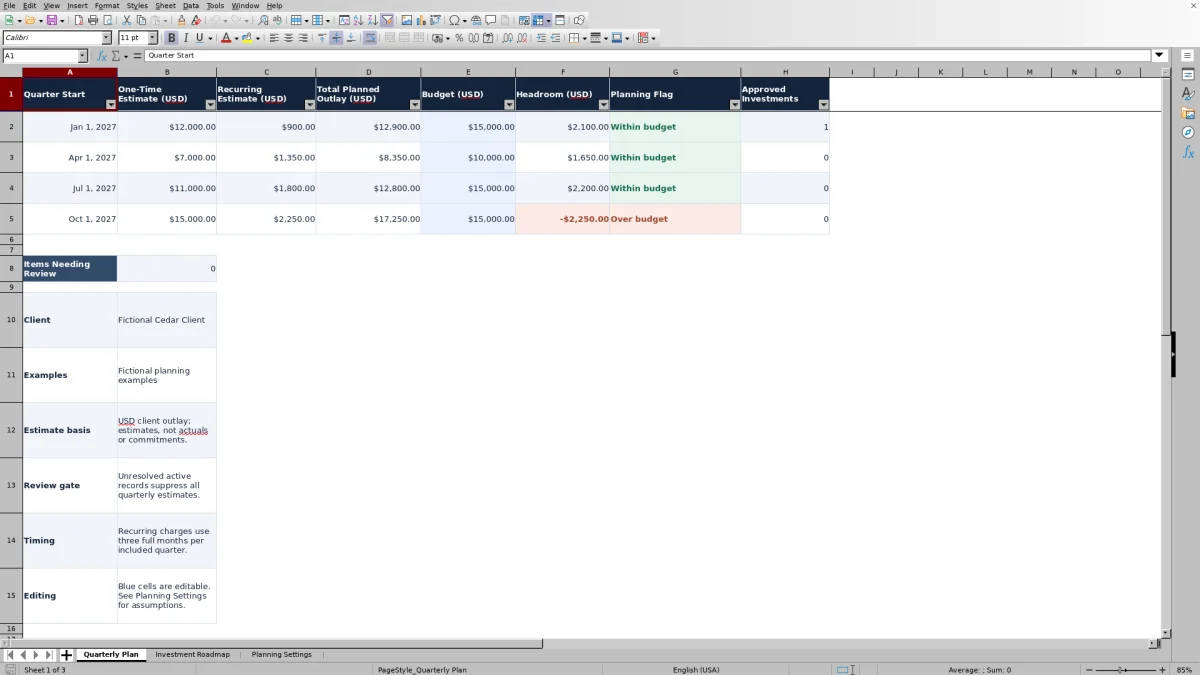
In Quarterly Plan, enter Budget (USD) for each quarter. Review Total Planned Outlay (USD), Headroom (USD), and Planning Flag together. Confirm recalculation in your spreadsheet application before using the results in a client discussion, and save a separately named copy when you need to preserve a planning baseline.
Build the roadmap around client decisions
A useful client roadmap explains why an investment belongs in the plan, not just when you hope to start it. In Business Goal, record the outcome you want the client to evaluate, such as improving reliability or supporting a planned expansion. The workbook stores that explanation; it does not score the benefit or calculate a return on investment.
Use the quarterly view to discuss which outcomes matter first and which costs the client can accommodate. An investment that fits the budget may still need to wait for a prerequisite. Conversely, a high-priority investment that exceeds the budget may require a scope change or a revised budget rather than a simple date change.
All monetary values represent estimated client outlay. They are not actual spending, MSP revenue, margin, markup, or contractual commitments. Check the scope behind each estimate before presenting the plan as a basis for a purchasing decision.
Separate proposal status from calculation readiness
Decision is a manual entry with three choices: Proposed, Approved, and Deferred. Proposed and Approved investments both contribute to the estimates when the review checks are clear. Deferred investments are excluded. Keep these labels spelled as supplied because the calculations use them.
Ready does not mean approved. Input Check reports whether the row meets the workbook's data requirements. It does not establish client authorization, technical suitability, or delivery readiness. Likewise, selecting Approved records your decision status; it does not create an approval workflow or evidence of authorization.
The Approved Investments count in Quarterly Plan counts approved, input-ready investments starting in that quarter. It is not a count of every approved service generating recurring charges in that quarter. Keep any supporting approval evidence in your normal client records.
Understand how quarterly outlay and headroom are calculated
The one-time estimate is assigned to the investment's selected start quarter. The monthly recurring estimate is multiplied by three for that quarter and each later quarter in the planning window. Each quarter therefore includes three full months of recurring charges from all included investments that have started by then.
Recurring charges continue through the horizon. The model does not prorate a mid-quarter start or provide an end-date input. If actual billing starts later or ends sooner, review that difference separately rather than treating the quarterly estimate as an invoice forecast.
Total Planned Outlay combines that quarter's one-time and recurring estimates. Headroom is the entered budget minus total planned outlay. A negative result means the plan exceeds the budget; zero means it exactly uses the budget. A positive result is unused budget within this estimate, not a calculated saving.
A blank budget leaves estimates visible but produces Enter budget and no headroom calculation. A numeric budget of zero is different: it represents no available budget, so any positive planned outlay produces an Over budget flag.
Sequence dependencies without confusing timing with completion
Depends on Investment ID accepts one predecessor ID for an investment. The predecessor must be unique, input-ready, and not deferred. The dependent investment must start at least the configured number of quarters after the predecessor's start. With the default lead of one quarter, a January 1 start permits a dependent start no earlier than April 1 of the same year.
Minimum Dependency Lead (Quarters) is an editable scheduling assumption from 1 to 4 whole quarters. It applies across the plan rather than giving every investment its own lead time. In a four-quarter window, a four-quarter lead leaves no room for both a predecessor and its dependent investment to start within that window.
These are scheduling checks, not completion checks. The formula does not verify that a predecessor has been delivered, and a predecessor need not have Decision set to Approved. Review authorization and real delivery feasibility separately. Where work has several prerequisites, the single predecessor field is not a substitute for a full project schedule.
Example: weigh a later investment against recurring costs
For an isolated example, use a planning start of January 1, 2027, a minimum dependency lead of one quarter, and only these two active investments. Replace or clear the other example inputs without deleting the check formulas:
- R01: device renewal for reliability, starting January 1, 2027; $10,000 one-time and $100 per month; Approved; no dependency.
- R02: workflow tools for productivity, starting April 1, 2027; $3,000 one-time and $50 per month; Proposed; dependent on R01.
- Budgets: $15,000 for the quarter starting January 1, 2027, and $4,000 for the quarter starting April 1, 2027.
With both rows valid and the dependency check clear, the first quarter has $10,000 in one-time costs plus $300 in recurring costs: $10,300 total and $4,700 headroom. The second quarter has $3,000 in one-time costs plus three months of both recurring estimates, or 3 × ($100 + $50) = $450. Total outlay is $3,450, leaving $550 headroom.
The workflow tools count in the estimate even though they are Proposed. The second quarter has zero approved investment starts, despite ongoing recurring charges from the approved device renewal. Before accepting the plan, confirm that the $550 remaining budget is adequate for the client's other needs and that R01 can actually support R02's start.
Troubleshooting blank totals and review flags
Blank estimates are not zero spending. Any unresolved active input or dependency record suppresses estimates for all four quarters. Start with Items Needing Review in Quarterly Plan, then inspect Input Check and Dependency Check in Investment Roadmap. If there are no input-ready investments, the summary can instead show No planned investments.
- Check inputs: supply the ID, investment name, and business goal; remove duplicate IDs; select a quarter in the current window; enter both estimates as nonnegative numbers; and select a valid decision. A blank cost is not treated as zero.
- Review dependency: confirm that the predecessor ID exists, differs from the current investment's ID, is input-ready and non-deferred, and starts early enough to meet the minimum lead.
- Review inputs after changing the horizon: existing start-quarter entries do not automatically move with the new planning window. Reassign them using the dropdowns.
- Check budget: replace text or a negative amount with a nonnegative numeric budget. An empty budget produces Enter budget instead.
A displayed zero total can be valid when ready investments exist but no included costs fall in that quarter. Check the investment dates and amounts before interpreting it. Do not mark a problematic investment Deferred merely to reveal totals unless deferral is the actual planning decision.
Comparison: this workbook or a blank spreadsheet
A blank spreadsheet can be appropriate when your planning model needs unusual billing periods, several dependencies per investment, or a different horizon. This workbook is useful when you want a defined four-quarter structure with cost rollups and review checks already in place. Neither approach removes the need to validate estimates and agree priorities with the client.
| Method | Planning structure | Cost calculation | Review responsibility | Best fit |
|---|---|---|---|---|
| This roadmap workbook | One client, four quarters, 100 prepared investment rows, and one predecessor field per investment. | Built-in one-time allocation, three-month recurring rollups, and budget headroom. | Built-in input and scheduling checks; you still verify scope, approvals, and feasibility. | A repeatable quarterly investment discussion using the supplied assumptions. |
| Blank spreadsheet | You design the fields, horizon, and dependency model. | You build and verify the formulas or calculate totals manually. | You define and maintain all checks. | A custom planning model when the supplied structure does not fit. |
Use a separate delivery process for assigning work, confirming completion, and tracking actual costs. This workbook has no integrations or live project updates; its value is a maintained planning view, not an execution system.
Frequently asked questions
Can I use one workbook for several clients?
The workbook is structured for one client, with a single Client Display Name and one combined investment plan. Use a separate copy for each client to keep budgets, dependencies, and estimates distinct. It does not provide a multi-client portfolio summary.
How many investments and quarters are prepared?
Investment Roadmap has 100 prepared investment rows, from rows 2–101, including eight fictional examples. Quarterly Plan covers four quarters. Do not assume entries below row 101 or added quarter rows will be included automatically; extending the workbook requires reviewing formulas, validation ranges, and summary logic.
Will the planning dates stay fixed when I reopen the file?
Planning Start Quarter initially uses a formula based on today's date to select the next calendar quarter. It can change when the workbook recalculates in a later quarter. To preserve a fixed window, replace that setting with a specific quarter-start date, such as January 1, 2027, and check all investment start-quarter selections.
Are the formulas protected from accidental edits?
No. Pale blue cells identify planning inputs, and formula cells are visually distinguished, but sheet protection is not applied. Edit the input cells, retain the calculated columns, and keep a clean copy so you can recover from accidental formula changes.
Can I use it in Excel or LibreOffice without checking the results?
Check recalculation in the application you intend to use before relying on the plan. Verify the quarter dropdowns, a known cost example, and the input and dependency flags. The workbook uses no macros, external links, or integrations, but that does not establish tested compatibility across application versions.
About the authors

Tessa WhitlockClient & service operations
More about this area of the library →
Nathan CalderwoodService economics & planning
More about this area of the library →