
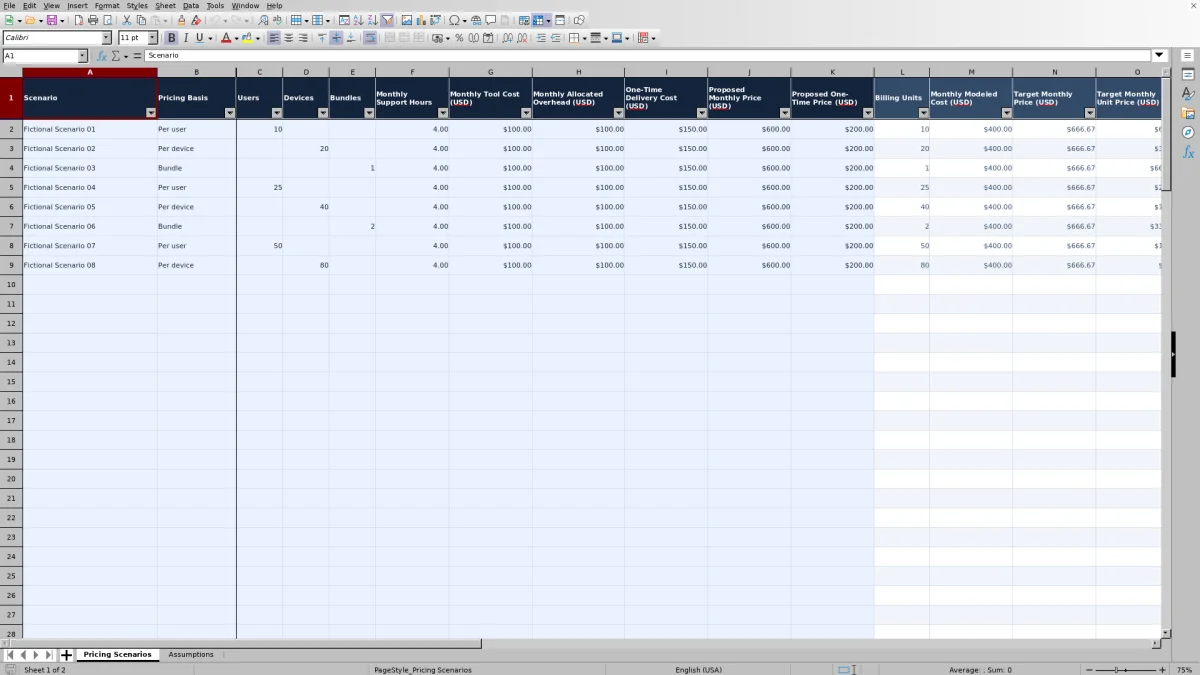
Before you quote a managed IT service, compare the proposed price with the cost of delivering it. This Excel pricing calculator helps you, as a managed service provider (MSP) owner, model per-user, per-device, or bundled prices from monthly support effort, tool costs, allocated overhead, and target margins.
Enter your own costs and proposed charges, then review calculated target prices, projected margins, and markup. The workbook separates recurring monthly pricing from one-time delivery charges. Its examples and starting assumptions are fictional planning inputs, not market rates.
When to use this workbook
- Check whether a proposed monthly charge meets your target margin under the costs you enter.
- Translate a total monthly target into a price per user, device, or owner-defined bundle.
- Keep one-time delivery costs and charges separate from recurring service pricing.
- Compare independent pricing scenarios before choosing the assumptions for a client quote.
What is in the file
How to use the workbook
1. Set your shared assumptions
On Assumptions, review Support Cost per Hour (USD), Monthly Target Margin, One-Time Target Margin, and Model Date in B2:B5. Replace the fictional starting values with your approved inputs. Enter target margins as percentages from 0% up to, but not including, 100%. The hourly cost and margin targets apply across the scenario rows.
2. Identify the scenario and billing quantity
On Pricing Scenarios, replace a fictional example in rows 2–9 or start in a blank prepared row from 10–101. Enter a Scenario name, select Per user, Per device, or Bundle in Pricing Basis, and enter a positive whole-number count only in the corresponding Users, Devices, or Bundles column.
3. Enter costs and proposed prices
Complete Monthly Support Hours, Monthly Tool Cost (USD), and Monthly Allocated Overhead (USD). Enter monthly costs as scenario totals, not per-unit amounts. Proposed Monthly Price (USD) is also the full monthly charge. Enter one-time delivery cost and proposed one-time price separately. Use explicit zero only for a confirmed zero amount; do not use it to stand in for an unknown cost.
4. Review the calculated results
Compare Target Monthly Price (USD) and Target Monthly Unit Price (USD) with your intended quote, then inspect Proposed Monthly Margin and Proposed Monthly Markup. Review the one-time target and margin separately. Inputs are in Pricing Scenarios A:K; preserve the formulas in L:S. Resolve missing inputs and warning colors before relying on a result.
Build the monthly cost before choosing the price
The model starts with the labor effort and costs you expect to incur for one client-service scenario. Monthly Modeled Cost (USD) equals Monthly Support Hours multiplied by Support Cost per Hour (USD), plus Monthly Tool Cost (USD) and Monthly Allocated Overhead (USD). The result is a monthly cost total, not a billable hourly rate or a revenue forecast.
Enter support hours as monthly labor effort. They are not elapsed resolution time, service availability hours, or a service-level agreement (SLA) response target. Use a defensible estimate of the work required to deliver the proposed scope, then apply an hourly cost that is consistent with your costing approach.
Tool costs and overhead must be monthly totals for the entire scenario. If your source data gives a tool cost per user, calculate the scenario total before entering it. Review the boundary between hourly support cost and allocated overhead so the same expense is not counted twice. The workbook combines your entries; it does not establish whether those entries cover every delivery expense.
Although the task is margin-based pricing, treat the resulting percentage as a modeled margin under your chosen cost allocation. It is not automatically the same as the gross margin reported by your accounting system. Reconcile cost definitions before using it in financial reporting.
Choose the billing basis without changing the cost scope
Pricing Basis determines which quantity becomes Billing Units: Users for Per user, Devices for Per device, or Bundles for Bundle. Target Monthly Unit Price (USD) then divides the total target monthly price by that selected quantity. A bundle is a pricing unit you define; the workbook does not prescribe its included users, devices, or services.
Changing the billing count does not automatically scale costs. The monthly cost calculation uses support hours, total tool cost, and allocated overhead—not the user, device, or bundle count. If a client grows from 10 to 20 users, update those cost assumptions as needed instead of changing only Users. Otherwise, the same total target will simply be spread across more billing units.
Likewise, switching from per-user to per-device pricing changes the denominator, not the service scope. Clear unused quantity fields and enter the count in the matching column to keep the scenario understandable. Record the scope behind an owner-defined bundle in your supporting quote documentation so the unit price has an operational meaning.
Each row is an independent scenario. Alternative prices for the same client are choices to evaluate, not separate revenue amounts to add together.
Example: interpret a monthly target and proposed margin
The fictional per-user example uses these grouped inputs: 10 users; 4 monthly support hours; $50 per support hour; $100 in monthly tool costs; $100 in monthly allocated overhead; a 40% monthly target margin; and a proposed total monthly price of $600.
- Monthly modeled cost: 4 hours × $50 per hour + $100 + $100 = $400.
- Target monthly price: $400 ÷ (1 − 40%) = $666.67 when displayed to cents.
- Target monthly unit price: the unrounded total target ÷ 10 users = $66.67 per user per month when displayed to cents.
- Proposed monthly margin: ($600 − $400) ÷ $600 = 33.3% when displayed to one decimal place.
- Proposed monthly markup: ($600 − $400) ÷ $400 = 50.0%.
The $600 proposal leaves $200 per month above the modeled cost, but its projected margin is below the 40% target. That is a reason to revisit the proposed price, delivery assumptions, or included scope—not evidence that the workbook has identified a market price.
Margin and markup use different denominators. Margin measures the difference between price and cost as a share of price; markup measures that difference as a share of cost. A 50% markup therefore does not mean a 50% margin. To reach the target with the same $400 modeled monthly cost, the full monthly price needs to be approximately $666.67. Review the scope and input quality before carrying that figure into a quote.
Keep one-time delivery pricing separate
Use One-Time Delivery Cost (USD) for the total nonrecurring cost you want to model, and Proposed One-Time Price (USD) for the corresponding charge. These entries do not feed the monthly modeled cost or monthly margin. The one-time calculation uses its own editable One-Time Target Margin on Assumptions.
For the fictional inputs of $150 in one-time delivery cost and a 25% target margin, Target One-Time Price (USD) is $150 ÷ (1 − 25%) = $200. A proposed one-time price of $200 produces a 25.0% proposed one-time margin. The result meets the one-time target even though the example's $600 recurring proposal falls below the monthly target.
This separation helps you avoid treating a profitable onboarding charge as evidence that the ongoing service price is sufficient. Review each result on its own. The workbook accepts a total one-time cost; it does not derive that cost from a separate implementation labor or materials breakdown. Prepare that supporting estimate outside the model, and do not interpret the two price streams as a combined contract profitability calculation.
Test delivery assumptions before committing to a quote
Use separate named rows to test differences in monthly support effort, tool spend, overhead, or proposed price. For example, keep the fictional 10-user scenario's $50 hourly cost, $100 tool cost, $100 overhead, 40% target margin, and $600 proposed monthly charge, but increase support effort from 4 to 6 hours per month.
The extra 2 hours add $100 to monthly modeled cost, bringing it to $500. The target monthly price rises to $833.33 when displayed to cents, while the proposed margin at $600 falls to 16.7%. This comparison shows how sensitive the proposal is to the support effort estimate. Before choosing a price, decide whether the lower-hour scenario is supported by the intended service scope and your delivery evidence.
Shared assumptions affect all scenario rows. Changing Support Cost per Hour or either target margin changes the relevant calculations throughout the workbook. Rows can compare different scenario-level inputs, but they do not each hold their own hourly cost or target margins. Save separately named copies if you need to preserve comparisons that use different shared assumptions.
This remains a planning exercise. The workbook does not track delivered support hours, import actual service costs, or establish that a projected margin was achieved. Review actual performance in your operational and financial records, then manually update the model when your assumptions change.
Troubleshooting blank results and warning colors
A blank result is not a zero-cost result. Monthly Modeled Cost (USD) stays blank when the Scenario name is missing, when any of the three monthly cost inputs is not numeric, or when the shared hourly support cost is not numeric. Enter a confirmed zero where appropriate rather than leaving a required cost field empty.
- If monthly targets are blank but modeled cost appears, check Pricing Basis and its matching positive quantity. Also check that Monthly Target Margin is numeric and at least 0% but below 100%.
- If proposed monthly margin is blank, check for a numeric proposed monthly price greater than zero and an available monthly modeled cost. Proposed Monthly Price (USD) must be the full monthly charge, not the unit price.
- If markup is blank, check the modeled cost. Markup is not calculated when monthly modeled cost is zero because its denominator would be zero.
- If the one-time target is blank, check the Scenario name, numeric one-time delivery cost, and valid one-time target margin. Proposed one-time margin needs a numeric cost and a proposed one-time price greater than zero.
Confirmed zero monthly costs can produce a zero modeled cost and zero target price. With a positive proposed price, they can also produce a 100% modeled margin. That is a mathematical consequence of the entries, not confirmation that the service can be delivered without expense.
Red in a proposed margin result means a numeric margin is below its corresponding numeric target; a margin equal to the target is not red. Red in markup means negative markup. These are review cues, not an approval process. Check the inputs and formulas even when no red warning appears, particularly after pasting data or editing the workbook.
Comparison: this workbook or a blank spreadsheet?
A blank spreadsheet is a realistic alternative when you want to design your own pricing logic. This workbook is useful when its cost structure matches your decision: monthly support labor, tool costs, allocated overhead, and a separate one-time delivery total. The choice depends on the model you need, not on an assumption that one approach is always better.
| Method | Starting structure | Pricing calculations | Review and maintenance |
|---|---|---|---|
| MSP pricing workbook | Prepared scenario inputs, three billing bases, and shared assumptions. | Built-in monthly cost, target prices, margin, markup, and separate one-time results. | Includes entry rules and warning colors; you still verify costs, scope, and formula integrity. |
| Blank spreadsheet | You define the cost categories, units, and layout. | You build and check formulas for your own pricing logic. | You create validation and review checks and maintain them as the model changes. |
Choose this workbook if you want the supplied structure and can express your scenario costs as the required totals. Build or adapt another model if your decision requires calculations not supplied here, such as tiered pricing, multiple labor cost rates within one scenario, or contract-wide cash flow. Do not force those needs into fields that have a different meaning.
Neither a pricing worksheet nor this workbook replaces accounting or service delivery records. This file has no live integrations or monitoring and does not track tickets, assets, or projects. Use it to support a pricing decision, then manage the resulting agreement and actual performance in the appropriate systems.
Frequently asked questions
Does the calculator recommend what MSPs should charge in the market?
No. Target prices are calculated from your entered costs and editable target margins. The fictional examples are not market benchmarks. Assess client requirements, service scope, and commercial positioning separately before deciding what to quote.
How many pricing scenarios are prepared in the workbook?
Pricing Scenarios has 100 prepared scenario rows, from row 2 through row 101. Rows 2–9 contain fictional examples, and rows 10–101 are blank prepared records. If you extend the sheet, verify formula references, validation, formatting, and the filter range rather than assuming they extend automatically.
What does Model Date control?
Model Date is an editable field on Assumptions, initially shown as Oct 2, 2026. It is not used in the listed pricing formulas and does not establish that costs have been refreshed. Set it to the date of your modeling review and verify the age of your source costs separately.
Why can a displayed unit price produce a slightly different total?
Calculations retain full precision while displayed money values are rounded to cents. For example, a $666.67 displayed monthly target across 10 users gives a displayed unit target of $66.67. Multiplying that rounded unit price by 10 produces $666.70. Decide how the quote will round unit charges, then enter the resulting full monthly total in Proposed Monthly Price (USD) to review its margin.
Can I rely on the results immediately after opening the XLSX file?
Let your spreadsheet application recalculate the workbook, then check the fictional reference example before using it for a quote. With the original assumptions, it should show $400 monthly modeled cost, a $666.67 monthly target, 33.3% proposed monthly margin, and 50.0% markup. Recalculation and this reference check are useful precautions, not a guarantee of compatibility across applications or versions.
About the authors

Tessa WhitlockClient & service operations
More about this area of the library →
Nathan CalderwoodService economics & planning
More about this area of the library →