When managed IT proposals use different pricing units and support terms, a lower monthly fee can hide a different scope. Use this Excel matrix to compare external managed service provider (MSP) proposals for a client or advise a buyer on which options need clarification.
Record included support, exclusions, quote validity, and fees, then apply shared user counts, device counts, and an evaluation period. The workbook calculates comparable charges for supported pricing models while keeping coverage acceptance separate from price. It supports shortlisting, not provider cost or profit calculations.
When to use this workbook
- Compare supported monthly pricing models using the same evaluation period and quantities.
- Keep exclusions and support-hour definitions visible alongside quoted fees.
- Identify options that need review before relying on calculated totals.
- Retain an internal quote reference so you can check entries against the source proposal.
What is in the file
How to use the workbook
1. Set the comparison assumptions
On Assumptions, review Evaluation Period (Months), Users to Price, Devices to Price, and Evaluation Date. These are editable. Evaluation Date defaults to TODAY(); enter a fixed date if you need a comparison tied to a specific review date. Use a positive whole number of months and whole-number quantities appropriate to the proposed environment.
2. Replace the fictional proposal inputs
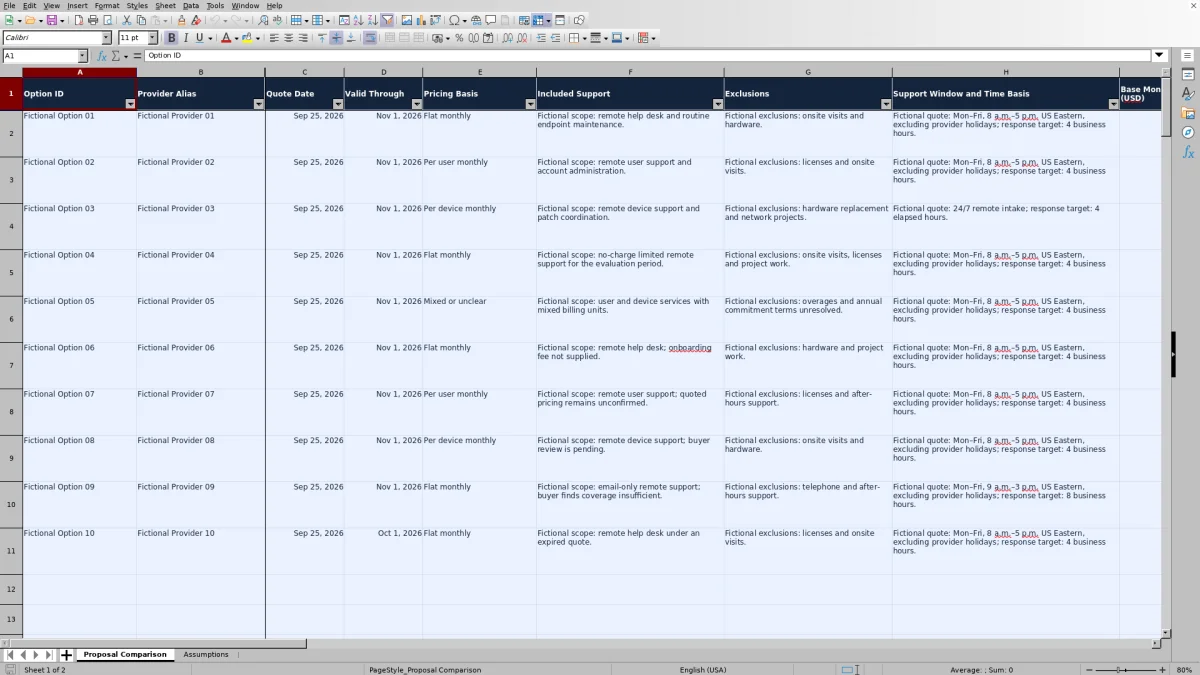
Rows 2–11 on Proposal Comparison contain fictional examples. Replace or clear their inputs before using the workbook for a client. Enter proposal details in columns A:M and an internal Quote Reference in column S. Leave the calculated columns N:R intact. Record Quote Date and Valid Through as actual Excel dates, such as October 2, 2026, rather than text labels.
3. Check scope and enter confirmed fees
Complete Included Support, Exclusions, and Support Window and Time Basis from the proposal. Select Pricing Basis and enter the base monthly fee, monthly unit rate, and one-time fee in USD. Use explicit zeros for confirmed fees that do not apply. Set Pricing Confirmed and Coverage Acceptable to Yes only after you have made those checks.
4. Resolve status issues before shortlisting
Read Comparison Status before comparing Monthly Recurring, Evaluation Recurring, or Evaluation Total. Resolve missing details, expired quotes, or unclear pricing with the proposal source. Filter the comparison list as needed, then evaluate price alongside scope; a Ready status is not a recommendation to select the option.
Establish comparable support before comparing prices
Use one row for each proposal option, including separate options from the same provider. Give each a distinct Option ID and retain its Quote Reference so you can return to the correct version. These are alternative purchasing choices: do not sum mutually exclusive options into a client budget.
Summarize what the buyer will receive in Included Support and what remains outside the offer in Exclusions. A proposal covering remote user support is not automatically equivalent to one covering device support and patch coordination. If licenses, onsite visits, or project work are excluded, consider whether the buyer still needs them before accepting the scope.
Coverage Acceptable is your judgment, entered manually. The workbook does not read the proposal or determine whether its wording meets the client's requirements. If an important boundary is unresolved, leave the option under review rather than treating a completed description as proof of acceptable coverage.
Normalize supported pricing without changing its meaning
The workbook supports Flat monthly, Per user monthly, and Per device monthly pricing. For a per-user or per-device option, it takes the corresponding quantity from Assumptions. Monthly Recurring equals the base monthly fee plus the monthly unit rate multiplied by that quantity. For Flat monthly, enter the quoted recurring amount as the base fee and zero as the unit rate; Units Used is then zero.
Evaluation Recurring multiplies that monthly result by Evaluation Period (Months). Evaluation Total adds the entered One-Time Fee once. These calculations assume the entered monthly fees and quantities apply throughout the evaluation period. The period is an editable comparison horizon, not evidence of the proposal's contractual term.
Mixed or unclear pricing needs clarification, not a guessed unit rate. Proposals combining user and device charges, changing rates, or annual commitments that require interpretation need a confirmed comparable basis before their totals can be relied on. Prices exclude taxes and unconfirmed usage charges, and exclusions are not automatically costed. This is a buyer-side charge comparison, not a labor-cost, margin, or markup calculator.
Example: three prices, three different scopes
For a reproducible fictional comparison, set the evaluation period to 12 months, users to 25, devices to 40, and Evaluation Date to October 2, 2026. The three example quotes are dated September 25, 2026, and valid through November 1, 2026. Assume their required details are complete and both confirmations are Yes.
- Fictional Option 01 uses Flat monthly pricing: a $1,000 base monthly fee, a $0 unit rate, and a $500 one-time fee. Monthly Recurring is $1,000; Evaluation Recurring is $12,000; Evaluation Total is $12,500.
- Fictional Option 02 uses Per user monthly pricing: a $100 base monthly fee, $40 per user per month, and a $0 one-time fee. At 25 users, the monthly charge is $100 + ($40 × 25) = $1,100. The 12-month total is $13,200.
- Fictional Option 03 uses Per device monthly pricing: a $0 base monthly fee, $25 per device per month, and a $200 one-time fee. At 40 devices, the monthly charge is $1,000 and the 12-month total is $12,200.
Option 03 has the lowest calculated total of these three, but the lowest total is not a scope match. Its fictional coverage is remote device support and patch coordination, while Option 02 describes remote user support and account administration. Check the required services and exclusions before treating the price difference as a reason to shortlist. With the default TODAY() evaluation date, the quotes may instead show as expired after November 1, 2026.
Preserve the meaning of response targets
In Support Window and Time Basis, record the quoted days, hours, time zone, holiday exclusions, and whether response targets use business hours or elapsed time. A target of 4 business hours within Monday–Friday, 8 a.m.–5 p.m. US Eastern coverage is not equivalent to 4 elapsed hours. Time outside the stated window may be treated differently under the proposal's terms.
Also distinguish intake availability from the work promised after intake. A statement of 24/7 remote intake does not, by itself, establish 24/7 resolution coverage. Ask for clarification if the proposal does not explain when response or resolution clocks run.
These entries describe quoted commitments, including any service-level agreement (SLA) targets. They are not measurements of actual performance. The workbook does not monitor tickets or calculate whether a provider met its response obligations.
Troubleshooting missing totals and review statuses
A blank total does not mean zero cost. A non-Ready row suppresses its calculated pricing outputs. Read Comparison Status first, then correct the underlying input rather than typing over a formula.
- Review needed: check identifiers, quote dates, support descriptions, exclusions, support-window details, Quote Reference, and numeric assumptions. Pricing Confirmed and Coverage Acceptable must both be Yes. This status takes precedence, so resolving it may reveal another issue.
- Expired: Valid Through is earlier than Evaluation Date. Obtain a current quote instead of changing the evaluation date merely to make an outdated offer pass. A quote valid through the evaluation date is not expired under this check.
- Clarify pricing: the pricing basis is not one of the three supported monthly models. Confirm how the offer should be compared rather than forcing mixed charges into one unit rate.
- Incomplete pricing: check for missing or negative fees and for a nonzero unit rate on a Flat monthly option. Enter zero only when the fee is confirmed not to apply.
A Ready row can legitimately calculate $0 when its entered fees are zero; that means the arithmetic produces zero, not that the workbook verified free service. Likewise, zero Units Used is expected for Flat monthly pricing. After pasting data, inspect dates, fees, and assumptions because pasting may bypass validation. If results look stale, check recalculation in your spreadsheet application before relying on them.
Keep a defensible comparison snapshot
Evaluation Date defaults to TODAY(), so quote validity can change when the workbook recalculates on a later day. For a dated client review, replace that formula with the actual review date and save a separately named copy. Preserve the original proposal documents outside the workbook and use Quote Reference to identify them.
Ready means worksheet checks passed: it does not establish contract adequacy, security certification, or suitability for every client requirement. Recheck the proposal's full-period pricing and quantities before presenting a recommendation. If you change shared user or device counts to explore another scenario, all applicable options use the revised assumptions; save separate copies if you need to retain both scenarios.
Use internal reference labels rather than web links in Quote Reference. Do not enter contacts, personal data, customer secrets, credentials, or sensitive security details. Keep descriptions sufficient for comparing scope without turning the matrix into a repository for operational secrets.
Comparison: this workbook or a blank spreadsheet?
A blank spreadsheet can be appropriate when proposal structures require a custom model. This workbook is useful when your task fits its supported monthly pricing bases and you want scope, fees, and review checks organized together. Neither approach replaces reading the source proposals.
| Method | Initial setup | Pricing treatment | Review checks | Best fit |
|---|---|---|---|---|
| MSP proposal comparison workbook | Prepared fields, assumptions, and 100 proposal rows | Flat monthly or base fee plus one monthly user or device rate, with one-time fees | Built-in completeness, quote-validity, pricing, and acceptance checks | Shortlisting proposals that fit the supported pricing models |
| Blank spreadsheet | You design the fields, formulas, and review process | You can model other structures, but must build and verify the calculations | You must create checks or perform them manually | Comparisons requiring custom treatment of tiers, changing rates, or mixed units |
Choose based on the proposals you need to evaluate. If a quote falls outside this workbook's model, obtain clarification or use a separately verified custom calculation rather than editing the meaning of the offer to make it fit. The prepared matrix reduces setup work; it does not remove the need for source checks or buyer judgment.
Frequently asked questions
Can I compare multiple options from the same provider?
Yes. Use a separate row and distinct Option ID for each proposal option, with the appropriate Provider Alias and Quote Reference. Compare them as alternatives rather than adding their totals together unless the source proposal explicitly describes separate services being purchased together.
How many proposal options are prepared in the workbook?
Proposal Comparison has 100 prepared rows, from row 2 through row 101. Rows 2–11 contain fictional examples. Replace or clear those input cells before a live comparison, and retain the formulas in columns N:R. If you extend the sheet, check formula coverage, validation, and filter ranges rather than assuming they extend automatically.
Does Coverage Acceptable automatically assess the proposal?
No. It is a manual buyer judgment with Yes, No, and Not reviewed choices. You must compare the included support and exclusions with the client's needs. Choosing Yes allows that acceptance check to pass; it does not establish a contractual conclusion.
Can the evaluation period be longer or shorter than 12 months?
Yes. Edit Evaluation Period (Months) on Assumptions using a positive whole number. The workbook multiplies the monthly recurring charge by that period and adds the one-time fee once. Confirm that the quoted rates, quantities, and commitments remain applicable for the full period; changing the assumption does not change the provider's terms.
Does the total include every cost of purchasing managed IT support?
No. Evaluation Total includes the calculated recurring charge over the chosen period plus the entered one-time fee. Taxes, unconfirmed usage charges, and the cost of excluded services are not automatically included. Review those items separately before treating a shortlist total as a purchasing budget.
About the authors

Tessa WhitlockClient & service operations
More about this area of the library →
Nathan CalderwoodService economics & planning
More about this area of the library →